Tower sites & import
The route is structured tower by tower instead of being spread across spreadsheets.
- Tower list and route import (CSV/Excel with coordinates)
- Spans between towers
- Route progress per tower

Project control for high-voltage overhead lines
Grid operators and general contractors manage tower sites, planned vs. actual quantities, records and as-built documentation in one shared project view – instead of spreadsheets and e-mail threads.
Benefits
GridTrace brings sites, documents, tasks and status information together in the context of each project. The teams involved can see how things relate and agree on next steps more clearly.
In GridTrace, clarifications stay attached to the case instead of getting lost in an inbox.
Deviations become visible early and are resolved in a defined way instead of by e-mail.
As-built documents are generated from the recorded data.
Features
A web app with which grid operators and general contractors manage high-voltage overhead line projects – construction, replacement and refurbishment of transmission towers.
The route is structured tower by tower instead of being spread across spreadsheets.
See per tower what is to be installed – progress and deviations per site instead of in spreadsheets.
Delivered quantities end up at the right tower and are not counted twice.
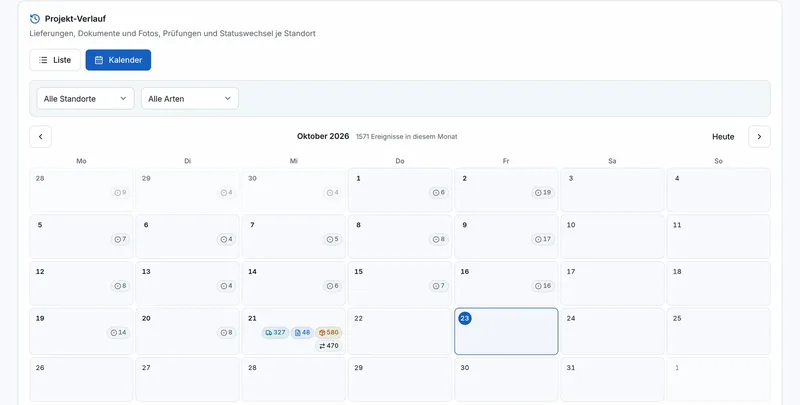
A calendar view of what happened at which site and when (deliveries, photos, inspections).
As-built documents are generated from the recorded data – for handover to the grid operator from the existing data.
The status per tower and project is visible at a glance.

Core workflow
One data set for everyone involved: the general contractor creates the project and selects the responsible grid operator, then each step builds on the previous one.
Create the project, select the responsible grid operator and record or import the tower sites of the route.
Read planned quantities from drawings and actual quantities from delivery notes – assigned per tower.
See deviations per site and resolve them with a justification instead of reconciling spreadsheets.
Track progress per site and see in the calendar what happened when: deliveries, photos, inspections.
As-built documents as PDF after completion, adapted to the grid operator’s requirements.
Who it is for
Grid operators manage their own projects or view projects run by general contractors. General contractors set up projects for different grid operators. Both work on the same project state.
Manage your own projects or view those of general contractors: planned vs. actual per tower, history per site and as-built documentation to your requirements.
Upload the delivery note and the actual quantity is in the project. One system for projects of different grid operators – with the as-built PDF at the end.
Trust & security
Grid operators set high information security requirements for their service providers and software. That is why we only list properties that GridTrace and this website actually implement – without certificates or declarations of conformity.
The activity history is only appended to, never overwritten.
Roles such as project management, site management, supervisor and a viewer role with read-only access reflect responsibilities.
Sign-in with a dedicated GridTrace account.
Documents stay assigned to the matching site or case.
No analytics script is loaded without consent. Fonts are served from our own server; no external font services are called.
We do not advertise certificates or declarations of conformity. We agree information security and data protection requirements with you per project.
Change history · sample view
FAQ
The key questions about use, teams, tower sites, documents and data protection – short and without marketing phrases.
Another question? Request a demo
For high-voltage overhead line projects (110/220/380/525 kV): construction, replacement and refurbishment of transmission towers. Tower sites, planned vs. actual quantities, records and progress are managed together – instead of scattered spreadsheets, e-mail threads and isolated tools. GridTrace is currently in beta; we agree on its use in your project individually.
Grid operators, general contractors and the teams involved in a project: project management, site management, documentation and authorised external partners.
Tower sites, open items, records and status sit in one shared project view. Coordination is based on the current state – not on the latest file version in someone’s inbox.
Each tower site bundles master data, status, tasks, documents and records in the project context, so plan, execution and documentation stay traceable in one place.
Among others drawings, delivery notes, material certificates, as-built documents and other project files – each assigned to the matching site or case instead of disappearing into generic folder structures.
Responsibilities, open items, status and related documents are visible in the project context. Handovers can be compiled as a traceable state.
After your enquiry, we will get in touch with you personally. In a short call we discuss your project and, if you like, show you GridTrace in a demo. We then agree on its use in your project individually.
Purpose, scope of data, roles, access, retention and deletion are agreed with you before use. This website is covered by our privacy policy; use of the app is covered by the data protection documents agreed for the project.
Request a demo
Briefly describe your project. Together we look at goals, scope, roles and data.
Thank you – your request has been sent. We will get back to you.
Please check your details – name, company and a valid business e-mail address are required.
Your request could not be sent just now. Please try again or write to info@gridtrace.de.